
As working from home becomes common, more people may discover how easily long hours at a desk can lead to back and shoulder pain. Paying attention to posture and movement matters more than ever.
I have worked from home for ten years and have had a lot of physical problems due to posture. I have learned a lot through experience. I worked for years with my physiotherapist to manage those problems.
Having a good working posture has always been one of the main challenges of the digital nomad lifestyle for me. The right equipment and some creativity can make a real difference.
You might think this is not important for you because you don't experience any pain yet, but it is worth making changes before problems appear. Once pain becomes persistent, it can be hard to resolve completely.
Sitting
When you sit down to work on a computer, there are three main points to focus on:
- The top of your screen should be at eye level.
- Your spine should be in a neutral position.
- Your arms and legs should be at rest.
https://twitter.com/gijsheerkens/status/1249619109911945217
Top of screen at eye level
The top of your screen should be at eye level so your neck is in its neutral position and you can look straight ahead.
Make sure the screen isn't too far away from your eyes so you can still read everything properly, or it will make you want to tilt your head forward.
The Roost Stand is a great and compact laptop stand to raise your screen to eye level. You may need to put it on books, a drawer, or a box to get to the best height.
Furthermore, you'll need a separate keyboard and mouse.
Spine in neutral position
Your spine, or vertebral column, has a neutral curve that you can aim to preserve while you work. This means you should avoid bending forward, having a rounded spine.

You can manage this by using an office chair with lower back support.
Arms and legs at rest
Keep your arms at roughly a 90-degree angle, leaning on the desk and ideally on the armrests of a chair.
An office chair with adjustable armrests is the best option, and an adjustable desk is even better.
Keep your legs at roughly a 90-degree angle, with your feet flat on the ground. An office chair adjustable in height is the best option.
Standing
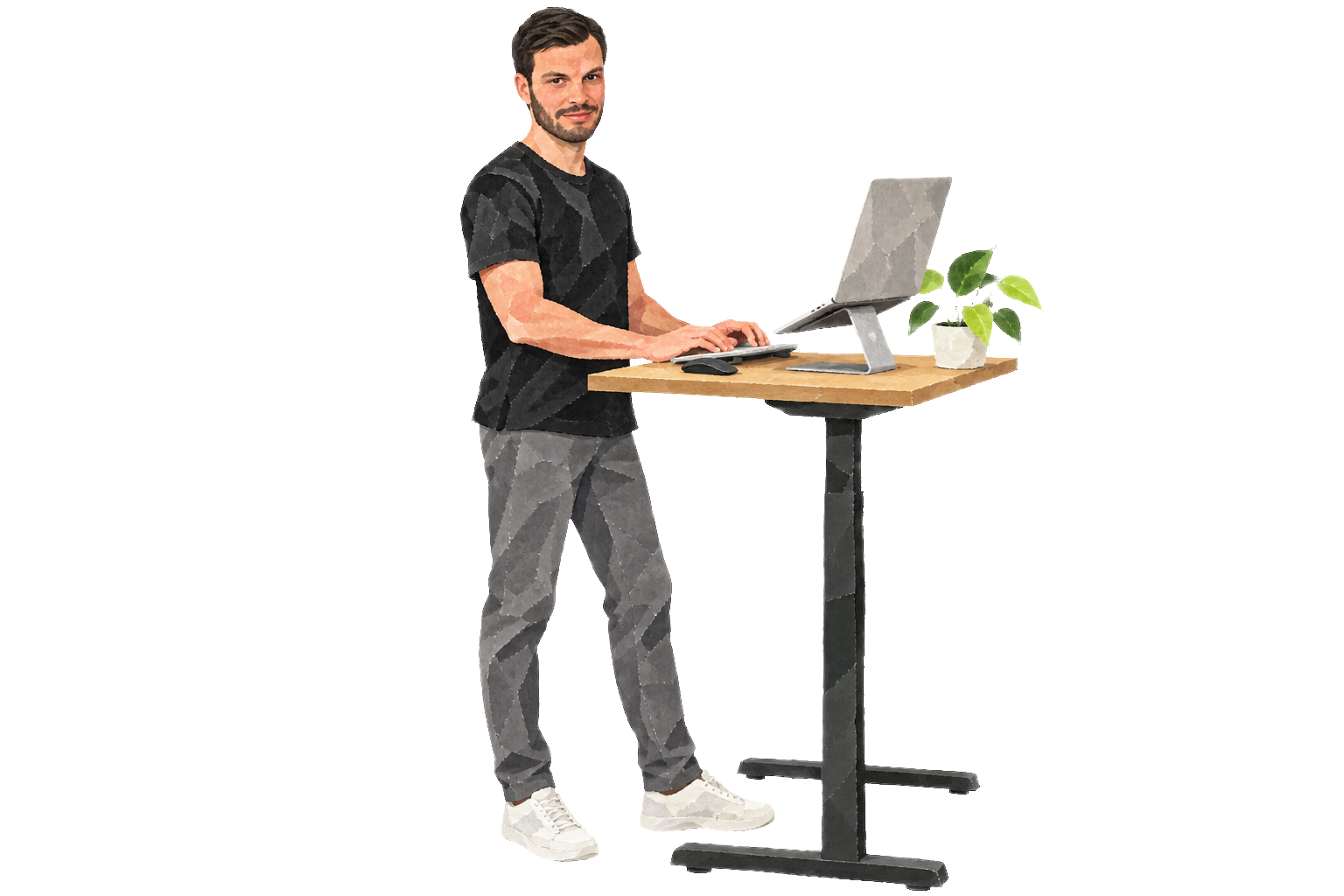
Experts have long been advising people to stand at their workstations for about 25% to 50% of the time. A standing desk can be of great help here. A height-adjustable desk lets you work both sitting and standing.
When you stand up to work on a computer, there are three main points to focus on:
- You should stand up straight.
- The top of your screen should be at eye level.
- Your arms and legs should be in a natural position.
https://twitter.com/gijsheerkens/status/1249627125210062852
Stand up straight
Stand up straight. Standing comfortably for long periods can take practice. This is why a standing desk may help you vary your posture.
Make sure your spine maintains its natural curve and pull your shoulder blades together. Don't bend forward or tilt your pelvis.
Aim to keep your neck, hips, and feet roughly aligned.
Top of screen at eye level
The top of your screen should be at eye level so your neck is in its neutral position and you can look straight ahead.
Make sure the screen isn't too far away from your eyes so you can still read everything properly, or it will make you want to tilt your head forward.
The Roost Stand is a great and compact laptop stand to raise your screen level to eye level. You may need to put it on books, a drawer, or a box to get to the best height.
Furthermore, you'll need a separate keyboard and mouse.
Arms and legs in a natural position
Your arms and legs should be in natural standing positions. This means the legs should be in a slightly wide stance, with your knees slightly bent, so you balance on both legs evenly.
Keep your arms at roughly a 90-degree angle throughout the day, leaning on the desk, so your standing desk should be at elbow height.
Alternating
Alternating between positions during the day is key. My physiotherapist told me to drink lots of small glasses of water. Getting refills gives you a reason to stand and walk several times an hour.
Another option is to switch between several working positions throughout the day. This is an approach I was discussing with Boris on Twitter. It matches the general guidelines that alternating between positions is key.
You can sit, stand, walk, lounge, or lie down at different times. An iPad Pro has made me consider working this way. I think if you don't have a lot of repetitive tasks to do, it might work.
https://twitter.com/Boris/status/1125776961320706049
Maintenance
Beyond your desk setup, these habits may help you stay mobile:
- Do some lower back yoga stretches every morning.
- Buy a resistance band and do face pulls or some other shoulder mobility exercises.
- Weight lifting is the best way to stay fit and healthy overall.
- Keep moving, walk at least 30 to 60 minutes a day.
- Consider a regular massage, perhaps once a month, to loosen your muscle tension.